Introducing CodeBuddy: A Deep-Agent Coding Assistant for Your Editor

Most AI coding tools autocomplete a line and call it a day. Ask one to “add OAuth2 to the auth module and make the tests pass” and it hands you a plausible diff, a shrug, and a stack trace to sort out yourself. The hard part is still yours: holding the whole task, running the tools, checking the result, fixing what broke.
We wanted something that could hold the whole task. So today I’m introducing CodeBuddy: an open-source, deep-agent coding assistant that runs inside your editor. It plans the work, delegates isolated pieces to specialist subagents, runs the tools against your real files, verifies the result, and heals itself when a step fails. It does all of this with your own model keys, and your code never leaves your machine.
It installs in VS Code, and via the Open VSX Registry it runs in Cursor, Windsurf, and VSCodium too.
The word that matters: deep
Section titled “The word that matters: deep”The gap between AI coding tools isn’t the model. It’s the loop around the model.
A shallow agent is a single loop: your message goes to the LLM, the LLM calls a tool, the result goes back, and it answers. This is most autocomplete and chat tools. It works beautifully for “rename this variable” and falls apart on anything that takes more than a few steps. The model tries to hold the entire plan, every file, and every decision in one context window. It forgets steps. It loses track of what it changed. It hallucinates file paths.
A deep agent externalizes what a shallow one tries to remember. It writes the plan down as a checklist. It hands each chunk of work to a fresh subagent with its own context. It reads and writes real files instead of stuffing them into the prompt. It survives long tasks because it was never trying to hold them in its head.
CodeBuddy is built on Deep Agents, LangChain’s implementation of exactly this pattern (the same one behind Deep Research, Manus, and Claude Code), running on top of LangGraph. The entire assistant is, at its core, a single createDeepAgent() call. Everything else plugs into it.
Anatomy of the agent
Section titled “Anatomy of the agent”Here’s what actually happens when you give CodeBuddy a task.
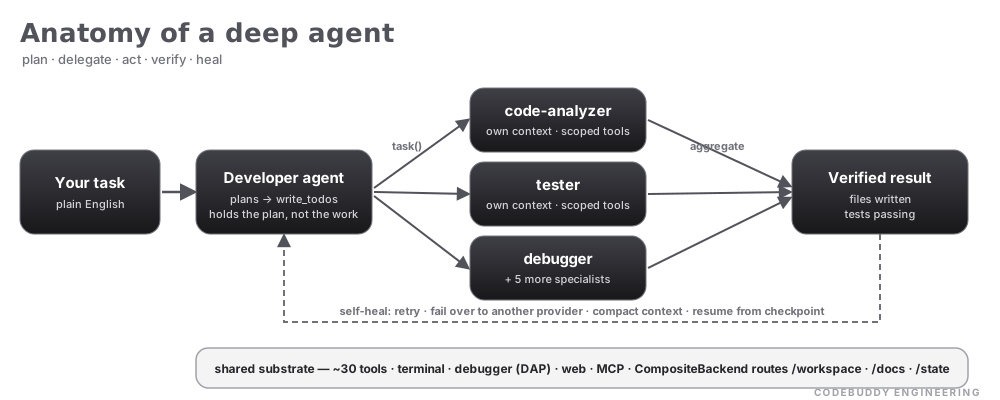
It plans. The developer agent decomposes your request into a todo list and works through it, checking items off as it goes. The plan lives outside the model’s context, so it doesn’t have to remember it; it can re-read it.
It delegates. Complex sub-jobs go to one of eight specialist subagents: a code-analyzer, a tester, a debugger, an architect, a reviewer, a doc-writer, a file-organizer, and an architecture-expert. Each spins up with its own context window and a scoped set of tools. The code-analyzer is read-only; the tester can’t delete files. When a subagent finishes, its result flows back and the subagent is destroyed. No context pollution, no leakage between tasks.
It acts. Around every agent is a shared substrate of ~30 built-in tools: file editing, an AST-aware editor that replaces a function or class body cleanly, terminal execution, ripgrep and semantic search, a full debugger integration over DAP (inspect the stack, read variables, evaluate expressions in a live session), web search, and a browser. On top of that sit the six file-system primitives from the Deep Agents backend, plus any MCP server you connect and any skill script you write. The agent doesn’t know or care where a file physically lives. A CompositeBackend routes /workspace to your real editor files, /docs to persistent cross-session storage, and everything else to ephemeral state.
It heals. Production agents fail. Models hallucinate, APIs time out, rate limits hit. CodeBuddy diagnoses the kind of failure and picks the right recovery, across four layers:
| Layer | Handles | Mechanism |
|---|---|---|
| Recovery | Tool errors, malformed steps | Fail-open retry with the real error fed back (sanitized, sentinel-tagged) |
| Failover | Rate limits, auth, overload | Classify the failure, cool down the provider, switch to a fallback |
| Compaction | Context-window overflow | Summarize and compact history before it blows the budget |
| Checkpoint | Unrecoverable errors | Resume from a saved checkpoint instead of starting over |
An auth error doesn’t trigger a blind retry (it would just fail again); it’s classified and handled differently from a rate limit. That distinction is the difference between an agent that recovers and one that spins.
What that buys you
Section titled “What that buys you”Architecture is only interesting if it does something a shallow loop can’t. These are the tasks CodeBuddy is built for. Each one is 20 to 50 tool calls across several subagents, more than any single context window can hold:
- “Refactor the payment module.” Plans the steps, sends analysis to the
code-analyzer, rewrites with a code specialist, runs the suite with thetester, and fixes failures in a loop until it’s green. - “Debug this production error.” Reads the stack trace, attaches to the debugger over DAP, inspects live variables, traces the root cause, and writes the fix.
- “Add i18n support.” Scans every user-facing string, generates the translation files, updates the components, and checks each locale.
Any model. Your keys. Your machine.
Section titled “Any model. Your keys. Your machine.”CodeBuddy is bring-your-own-key. Point it at Anthropic, OpenAI, Google Gemini, Groq, DeepSeek, Qwen, or GLM, or run it fully local against Ollama or any OpenAI-compatible endpoint (LM Studio included), so your code never touches an external API at all. Inline completion supports model-specific Fill-in-the-Middle tokens for local models.
Everything runs client-side in your editor. There is no CodeBuddy backend in the path: no server, no telemetry home, no code leaving your machine unless you configure a cloud provider. For teams that need more:
- Credential proxy. Keys live in your OS keychain and are injected by a proxy bound to
127.0.0.1only, so they never reach the model client or the webview. - Permission profiles.
restricted,standard, ortrusted, overridable per-project, controlling what the agent may do without asking. - Human-in-the-loop approvals. Destructive actions like
delete_fileand non-allowlisted terminal commands pause for a modal that shows you exactly what’s about to run. - Access control. Allow or deny by email or GitHub username for shared setups.
- Prompt-injection hardening. Untrusted tool output and error text is wrapped in sentinel tags so the model reads it as data, not instructions, and any LLM-generated code runs only in a QuickJS WASM sandbox.
Under the hood
Section titled “Under the hood”A few of the engineering decisions I’m most happy with:
| 8 specialist subagents | Each with an isolated context and a role-scoped toolset |
| ~30 built-in tools | Plus 6 file-system primitives, plus unlimited MCP servers and skill scripts |
| 8 model providers | 7 cloud plus fully-local; bring your own key |
| 17 connectors | GitHub, GitLab, Jira, Linear, Sentry, Datadog, Postgres, MongoDB, Redis, Kubernetes, AWS, and more |
| 7 Tree-sitter grammars | WASM AST parsing for JS/TS, TSX, Python, Go, Rust, Java, PHP |
| 4 worker threads | AST analysis, codebase indexing, embeddings, and vector search, kept off the UI thread |
| Hybrid retrieval | sql.js vector store with BM25, MMR re-ranking, and temporal decay |
There’s a quieter theme running through the codebase too: it documents its own scars. The checkpointer is a custom sql.js implementation written specifically to dodge native-module fragility in the VS Code sandbox. The ripgrep arguments were rebuilt to honor .codebuddyignore after a trace showed glob spending 14 seconds walking node_modules. Building a reliable agent is less about the clever prompt and more about the hundred unglamorous failure modes you handle after it meets a real codebase.
Try it
Section titled “Try it”CodeBuddy is MIT-licensed and open source, already running for thousands of developers across the VS Code Marketplace and Open VSX.
# VS Code / Cursor / Windsurf: search "CodeBuddy" in the Extensions panel,# or install by id:ext install fiatinnovations.ola-code-buddy
# VSCodium and other Open VSX editors: install from https://open-vsx.org/
The quickstart guide walks you from install to your first shipped feature in under five minutes.
If it saves you an afternoon, star it on GitHub. And if you build something with it, I’d love to hear about it.
This is the first post on the CodeBuddy engineering page. The ones that follow go deeper: how the middleware stack composes context, how memory works, how the agent recovers when it’s confidently wrong. Follow along.